
GoldFynch is built around 'cases'. If you would like to upload, interact, review, and produce files a GoldFynch case must be created either by you or by someone else who then gives you access to the case. Read on to learn how to create a new free or paid case.
Note:
- To create a case, you will need a GoldFynch account. Learn how to sign up for a GoldFynch account.
- You can create one free case with your account, and any number of paid accounts.
- Free cases are only available for goldfynch.com accounts and are not accessible to accounts through GoldFynch's regional offerings.
- To create a paid case (any plan above the free tier), you will need a payment method on file. Learn how to add a payment method.
- To create a case under an Organization, first connect a payment method to the Organization.
Creating a case
Step 1. Log in to your Goldfynch account

Step 2. Click on the + Create a New Case button on the screen that is displayed if you do not have any cases linked to your GoldFynch account.

If you have cases linked to your GoldFynch account, click on the Create New Case button at the top-right corner of the page.

Step 3. Enter a name for the case in the text box
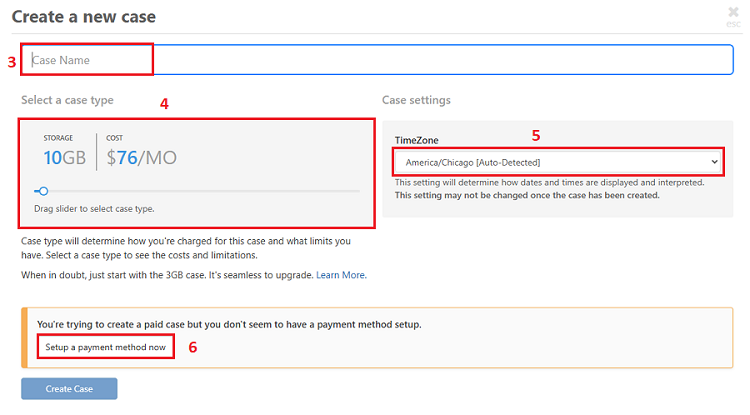
Step 4. Select a plan by dragging the slider to the left or right
Note: This step isn't required for the free plan. To select the free plan, drag the slider to the far left
Step 5. Select a time zone for the case. By default, the local time zone is selected from your browser.
IMPORTANT: A case's time zone cannot be changed after a case is created. However, the case name and plan can be changed by the case owner or admin user.
Step 6. Set up a payment method if you have selected a premium plan. Learn how to set up and manage billing and payment methods here.
Note: A payment method does not need to be set up if you have opted for a free case
Step 7. Click on the 'Create Case' button

Learn more about how to maintain your cases and account here:
Learn about how to add or change a billing method
Learn about how to change case plans
Learn how to rename your cases